If you run a business, work in accounts, or trade in the stock market through a registered firm, you probably need to deal with GST at some point. And the first step to doing anything on the GST system is the GST login.
In this article, I will explain how GST login works, common problems people face, and practical tips to make the process smoother. I am Shipon, and while my main area is stock market trading and technical analysis, many traders and small business owners who follow my work also run their own firms or proprietorship accounts. So understanding basic compliance tools like the GST portal is useful for them too.
Table of Contents
What Is GST Login
GST stands for Goods and Services Tax. It is an indirect tax system in India that replaced several older taxes like VAT, service tax, and excise duty.
To use any GST-related service, such as filing returns, checking your registration status, or downloading certificates, you need to log in to the official GST portal. This portal is run by the Goods and Services Tax Network (GSTN), which is the technology backbone for GST in India.
GST login simply means signing into this portal using your username and password so you can access your account dashboard.
How to Access the GST Portal Login Page
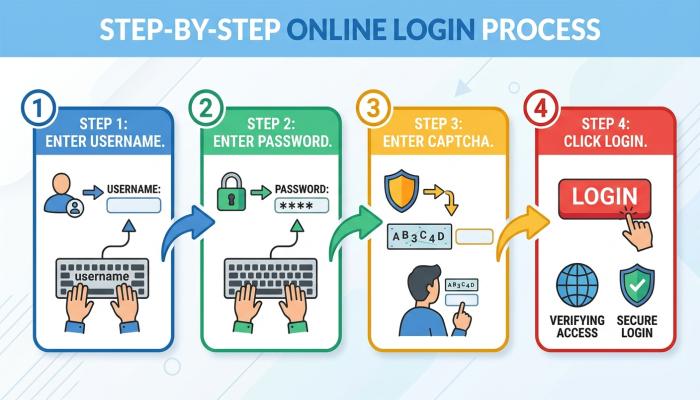
The GST portal login page is available on the official GST website. Here is the general process:
- Open the official GST portal in your browser.
- Look for the “Login” option, usually on the top right corner of the homepage.
- Enter your username and password.
- Enter the captcha code shown on screen.
- Click on the login button to access your dashboard.
Since portal designs and URLs can change over time, I would suggest you check the latest update information directly from the official government GST website rather than relying on a bookmarked link that may be outdated.
Types of Users Who Log In to the GST Portal
Not everyone logging into the GST portal has the same type of account. Broadly, users fall into a few categories:
Registered Taxpayers
Businesses and individuals who have completed GST registration and have an active GSTIN (GST Identification Number) can log in to file returns, view notices, and manage their profile.
Tax Practitioners
Chartered accountants and tax consultants often have their own login to manage GST compliance on behalf of their clients.
Unregistered Users
Some services on the GST portal, like tracking an application status or doing a basic GST verification, do not require a full login. These are available as public search tools.
GST Portal Login Search: Checking Details Without Logging In
Many people search for “gst portal login search” because they want to check a GSTIN number or verify a business without creating an account.
The GST portal offers a public search feature where you can:
- Check if a GSTIN is valid
- See the legal name of the business linked to that GSTIN
- Check the registration status (active, cancelled, or suspended)
- View the state and type of taxpayer
This is different from GST login because you do not need a username or password. You simply enter the GSTIN or business details in the search tool available on the portal.
This feature is useful before dealing with a new vendor, supplier, or client, so you can confirm their GST details are genuine.
Why GST Verification Matters
GST verification is important for a few practical reasons:
- It helps confirm that the business you are dealing with is genuinely registered.
- It reduces the risk of fake invoices or fraudulent billing.
- It helps in claiming input tax credit correctly, since incorrect GSTIN details can create complications later.
If you run any kind of business, including services related to trading, consulting, or subscriptions, verifying GST details of vendors is a good practice before making payments based on GST invoices.
Also Read: MCX Share Price: Current Price, History, Targets, Tips and Corporate Actions
Common Problems Faced During GST Login
Based on general user experience shared across various forums and common technical issues with government portals, here are some problems people often face:
Forgotten Username or Password
This is one of the most common issues. The portal usually has a “Forgot Username” and “Forgot Password” option on the login page, which sends an OTP or reset link to your registered mobile number or email.
Captcha Not Loading
Sometimes the captcha image does not load properly. Refreshing the page or trying a different browser often solves this.
Website Slow or Not Responding
Government portals can experience heavy traffic, especially close to return filing deadlines. If the site is slow, waiting for some time or trying during non-peak hours can help.
OTP Not Received
If you are not receiving the OTP for login or verification, check that your registered mobile number and email are updated correctly in your profile. Network delays can also cause OTP delays, so waiting a few minutes before requesting again is worth trying.
Account Locked After Multiple Failed Attempts
Entering the wrong password multiple times can temporarily lock your account. In such cases, using the password reset option is usually the way to unlock access.
Practical Solutions and Tips
Here are some simple things that can make GST login smoother:
- Always double-check you are on the official government GST website before entering login details, to avoid phishing pages.
- Keep your registered mobile number and email updated, since OTPs and reset links depend on these.
- Save your username separately in a secure place, since it is different from your GSTIN.
- Clear browser cache or try a different browser if you face loading issues.
- Avoid logging in from unknown public Wi-Fi networks, since tax-related accounts contain sensitive financial data.
Charges Related to GST Login and Portal Use
Logging into the GST portal itself is free. There is no charge for creating an account, checking your dashboard, or doing basic GST verification searches.
However, GST registration itself, return filing through professionals, or using paid third-party software to manage GST compliance may involve charges. These charges depend on the service provider and can change over time, so it is best to check current pricing directly with the relevant service or professional you are using.
Safety Considerations While Using GST Login
Since the GST portal contains financial and business information, keeping your login secure matters. A few basic precautions:
- Do not share your GST login credentials with unknown parties.
- Be cautious of emails or messages claiming to be from the GST department asking for login details. Government portals generally do not ask for passwords over email or SMS.
- Log out properly after using the portal, especially on shared or public computers.
- Enable any additional security options offered by the portal, such as two-factor verification, if available.
Who Should Use the GST Portal Login
- Business owners with active GST registration
- Freelancers and consultants registered under GST
- Chartered accountants and tax professionals managing multiple clients
- Traders operating through a registered business entity
Who May Not Need GST Login Right Now
- Individuals who do not have a GST registration and only want to verify someone else’s GSTIN can use the public search feature instead of creating a login.
- Very small businesses under the GST exemption threshold may not need to register at all. It is worth checking current threshold limits and rules from official sources, since these can be updated by the government from time to time.
Things to Check Before Using the GST Portal
Before relying on any GST login process, it helps to check:
- That you are using the correct, official GST portal URL
- Your registered contact details are up to date
- Your GSTIN certificate details match what is shown on the portal
- The latest process steps, since government portals occasionally update their interface and steps
FAQ
1. Is GST login free?
Yes, logging into the GST portal itself does not have any charge. It is a free government service.
2. Can I check a GSTIN without logging in?
Yes, the GST portal offers a public search feature to verify GSTIN details without needing to log in.
3. What should I do if I forget my GST portal password?
Use the “Forgot Password” option on the login page. It usually involves an OTP verification through your registered mobile number or email.
4. Is GST verification the same as GST login?
No. GST verification through the public search tool does not require login. GST login is needed for filing returns, viewing notices, or managing your account.
5. Can I use GST login on mobile?
The GST portal is generally accessible through mobile browsers, but for detailed or bulk activities, using a desktop browser is usually more convenient. Check the latest update information from the official portal for any dedicated mobile options.
Conclusion
GST login is a basic but important step for anyone managing GST compliance in India, whether you are a business owner, a freelancer, or a trader running things through a registered firm. The process itself is simple, but issues like forgotten passwords, OTP delays, or slow portal response are common and usually have straightforward fixes.
If you only need to check someone’s GST details, the public search feature saves you the trouble of creating a login at all. For anything beyond that, like filing returns or checking notices, a proper GST login account is necessary.
Always rely on the official GST website for the latest steps and features, since portal interfaces and rules can be updated over time.
Disclaimer
This article is for educational and informational purposes only. It is not financial, tax, or legal advice. GST rules, charges, and portal features can change over time, so please refer to the official GST website or consult a qualified tax professional for the most current information relevant to your situation.