Introduction
If you have ever wondered where the ₹ symbol came from, or how to type it on your keyboard, you are not alone. Many people search for this simple detail every day — students writing assignments, professionals typing invoices, or traders noting down numbers in their journals.
In this post, I will walk you through the rupee symbol in plain, simple language. I will cover its history, its meaning, how to type it in Word and on different devices, where to find it in text or PNG format, and a few practical tips. No jargon, no fluff — just the information you actually need.
What Is the Rupee Symbol?
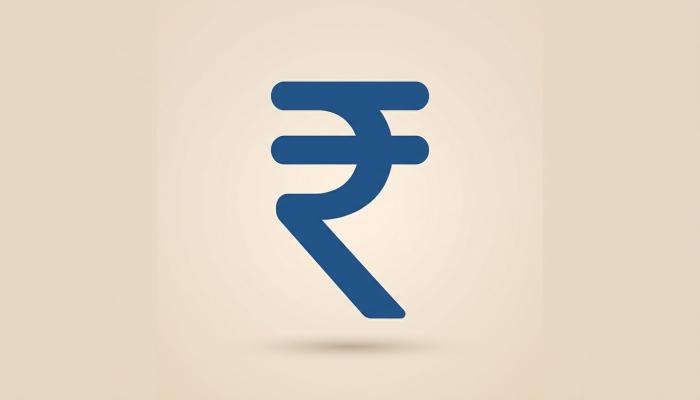
The ₹ symbol is the official sign for the Indian Rupee, the currency used in India. It was adopted by the Government of India to give the rupee a distinct visual identity, similar to how the dollar has $ and the euro has €.
Before this symbol was introduced, India used to write “Rs.” or “INR” to represent rupee amounts. The ₹ symbol replaced this in official use, though “Rs.” is still commonly seen in everyday writing, bills, and casual conversation.
Rupee Symbol History
The rupee symbol has an interesting design story behind it.
How the Symbol Was Chosen
In 2010, the Government of India held a public competition to design a unique symbol for the Indian Rupee. Thousands of designs were submitted by people from across the country. The winning design was created by D. Udaya Kumar, a postgraduate student from IIT Bombay (Indian Institute of Technology, Bombay).
The symbol was officially adopted on 15 July 2010 by the Union Cabinet of India.
The Design Behind ₹
The symbol combines the Devanagari letter “र” (ra) with the Latin capital letter “R”, without its vertical stem. It also has two horizontal lines at the top, similar to the design style used in the ₹, €, and ¥ symbols. This blend was meant to reflect both Indian identity and international recognition.
Why India Needed Its Own Symbol
Before 2010, the rupee did not have a dedicated symbol like other major currencies. This sometimes created confusion in international trade and finance, since “Rs.” could be mistaken for other currencies using similar abbreviations. Having a unique symbol helped give the Indian Rupee a clearer identity on the global stage.
Indian Rupee Symbol: Meaning and Usage
The Indian rupee symbol (₹) is now used officially by the Reserve Bank of India (RBI), government documents, currency notes, and most financial platforms in India, including banking apps and stock trading platforms.
You will commonly see it in:
- Bank statements and passbooks
- Currency notes and coins
- Stock market apps and trading platforms
- E-commerce websites and billing invoices
- Government forms and tax documents
Even though “Rs.” is still widely used in informal writing, the ₹ symbol is the standard for official and digital use today.
Also Read: Personal Finance: A Simple Guide for Indian Readers to Manage Money Better
How to Type the Rupee Symbol
This is one of the most searched things about the rupee symbol — simply because most keyboards don’t have a dedicated key for it. Here are the common ways to type it.
Rupee Symbol in Word (Microsoft Word)
There are a few simple ways to insert the ₹ symbol in Microsoft Word:
Method 1: Shortcut Key Type 2352 and then press Alt + X. This will convert the number into the ₹ symbol.
Method 2: Insert Symbol Menu Go to Insert tab, click on Symbol, then More Symbols. Search for “Indian Rupee Sign” and insert it.
Method 3: AutoCorrect (if set up) Some versions of Word or custom AutoCorrect settings allow typing “Rs” and having it auto-replace with ₹, but this depends on your settings.
Rupee Symbol on Windows
On Windows, you can use the keyboard shortcut Alt + 8377 (using the numeric keypad) in most applications.
Rupee Symbol on Mobile Keyboards
On most Android and iOS keyboards, you can access the ₹ symbol by:
- Switching to the symbols or currency keyboard.
- Long-pressing the “$” or currency-related key, which usually shows other currency options including ₹.
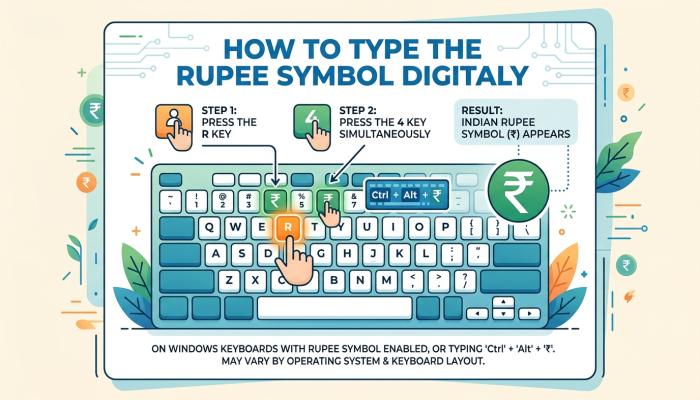
Exact steps may vary slightly depending on your phone’s keyboard app, so it’s a good idea to explore your keyboard’s symbol section once to find where it’s placed.
Rupee Symbol in HTML and Coding
If you’re building a website or working with code, the HTML entity for the rupee symbol is:
₹
This is useful for developers who want to display the correct symbol on web pages without copy-pasting it directly.
Rupee Symbol Text and Copy-Paste Option
If you just need the plain rupee symbol text to copy and paste, here it is:
₹
You can simply copy this symbol directly into WhatsApp messages, emails, spreadsheets, or documents whenever you need it, without going through keyboard shortcuts.
Rupee Symbol PNG and Image Use
Sometimes, especially for design work, presentations, or printed materials, people look for a rupee symbol PNG instead of plain text. This is usually needed when:
- Designing a poster, banner, or infographic
- Adding it to a logo or presentation slide
- Using it in image editing software like Photoshop or Canva
For this, you can search reputable free image or icon websites that offer currency symbol icons, and check their licensing terms before using them, especially for commercial projects. Always confirm whether the image is free for commercial use or only for personal use, since licensing rules vary between platforms.
Common Problems People Face With the Rupee Symbol
Even though the rupee symbol seems simple, a few common issues come up.
Symbol Not Displaying Correctly
Sometimes the ₹ symbol may show up as a box or a question mark on older devices or software. This usually happens because of outdated fonts that don’t support the Unicode character for the rupee sign.
Practical fix: Update your device’s software or switch to a modern font that supports the rupee symbol, such as most default system fonts on updated Windows, Android, or iOS versions.
Confusion Between ₹ and Rs.
Many people still use “Rs.” interchangeably with ₹, and both are understood. However, for formal documents, financial reports, or professional writing, it’s better to use the official ₹ symbol wherever your software supports it.
Difficulty Typing It Quickly
Since there’s no direct key on standard keyboards, some users find it inconvenient to type the symbol often, especially in bulk work like invoices or financial sheets.
Practical fix: If you type ₹ frequently, consider setting up a text shortcut or AutoCorrect rule in your word processor or spreadsheet software, so a simple keystroke combination automatically inserts the symbol for you.
Where You’ll See the Rupee Symbol in Trading and Finance
For readers interested in trading and investing, the ₹ symbol appears throughout stock market platforms, mutual fund statements, and brokerage apps in India. You’ll typically see it next to:
- Stock prices and order values
- Portfolio value and profit/loss figures
- Brokerage charges and account statements
Knowing how to read and type this symbol correctly is a small but useful skill, especially if you maintain your own trading journal or financial spreadsheets.
Who Might Find This Information Useful
- Students working on assignments or projects involving Indian currency
- Content writers and bloggers covering finance-related topics
- Traders and investors maintaining personal spreadsheets or journals
- Designers who need the correct symbol or its image version
- Anyone setting up billing or invoicing software for Indian customers
Things to Check Before Using the Rupee Symbol in Official Work
- Confirm that your software or website supports Unicode properly, so the symbol displays correctly for all users.
- If downloading a PNG image, check the source’s licensing terms, especially for commercial use.
- For official documents, prefer the ₹ symbol over “Rs.” wherever possible, as it is the standardized representation.
FAQ
Q1: Who designed the Indian rupee symbol?
The rupee symbol was designed by D. Udaya Kumar, and it was officially adopted by the Government of India in July 2010.
Q2: What is the shortcut to type the rupee symbol in Word?
Type 2352 and press Alt + X in Microsoft Word to insert the ₹ symbol.
Q3: Why doesn’t my rupee symbol show correctly on some devices?
This is usually due to an outdated font or software version that doesn’t support the Unicode character. Updating your device or app software often resolves this.
Q4: Is “Rs.” the same as ₹?
Yes, both refer to the Indian Rupee. However, ₹ is the official standardized symbol, while “Rs.” is an older, informal abbreviation still widely used in casual writing.
Q5: Can I copy and paste the rupee symbol instead of typing it?
Yes, you can copy the ₹ symbol directly from this article or any other source and paste it wherever needed.
Conclusion
The rupee symbol (₹) is more than just a currency sign — it represents India’s financial identity on the global stage. Whether you’re typing it in Word, looking for it in PNG format, or simply want to understand its history, the information above should cover most of your practical needs. It’s a small detail, but knowing it well can save you time, especially if you work with numbers, finance, or design regularly.
Disclaimer
This article is for educational and informational purposes only. It is not financial advice. Please verify official details from authoritative government or RBI sources where required, and check the latest updates for any information that may change over time.